Yangpyung

smartcubic manual book

smartcubic manual book

  • smartcubic manual
  • manual book
SmartCubic User Manual
SmartCubic Banner
Loading

SmartCubic User Manual

  • Home
  • Platform Introduction
  • Key Features
  • Usage Instructions
  • Benefits and Target Users
  • Usage Process
  • Reward System
  • Expert Tips
  • Story SmartCubic Manual
  • Get Started

SmartCubic Digital Manual Guide

Create and distribute digital manual books with a new concept. We will prepare a user manual that consolidates the core functions of the SMARTCUBIC (Smart Cubic) service. Clicking the time link next to it will immediately display the YouTube source video content explaining that part. If any part is difficult, press the time link next to it, and the video will appear right away, making it very easy to create.

[Manual] SMARTCUBIC User Guide: The Start of the Digital Revolution

This manual guides you through building a personal webpage using the SMARTCUBIC platform, creating digital brochures, and marketing methods utilizing social networks.

Platform Introduction

SmartCubic is an innovative platform for creating and sharing personalized digital content. Users can create their content in Cubic form and distribute it, which can be utilized in various channels such as web pages, mobile apps, and social media. The core of the platform is real-time updates and sharing functions, where once created content is immediately reflected to multiple users.

Real-Time Updates

Automatically reflects to all shared instances when content is modified.

Easy Sharing

Supports integrated sharing with QR codes, links, and social media.

Key Features

Registration and Login

Starts with simple email verification.

Smart Cubic Creation

Content creation combining images, videos, and text.

Multilingual Support

Automatic language detection and translation.

QR Code Function

Automatic generation and location-based check-in.

Community Building

Group creation and management.

Reward System

Activity-based point accumulation.

Usage Instructions (Simplified User Manual)

Smart Cubic usage consists of simple steps as below, allowing anyone to start easily. Mobile and web are synchronized in real-time.

1

Registration and Login

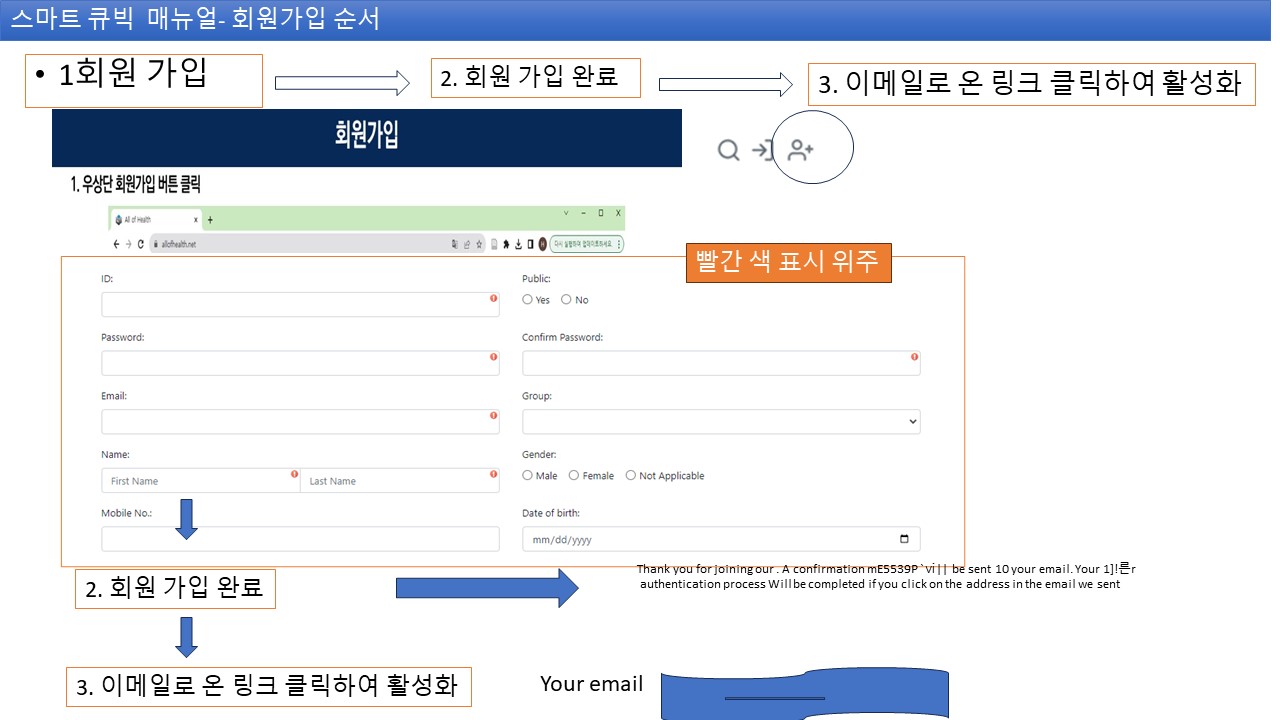
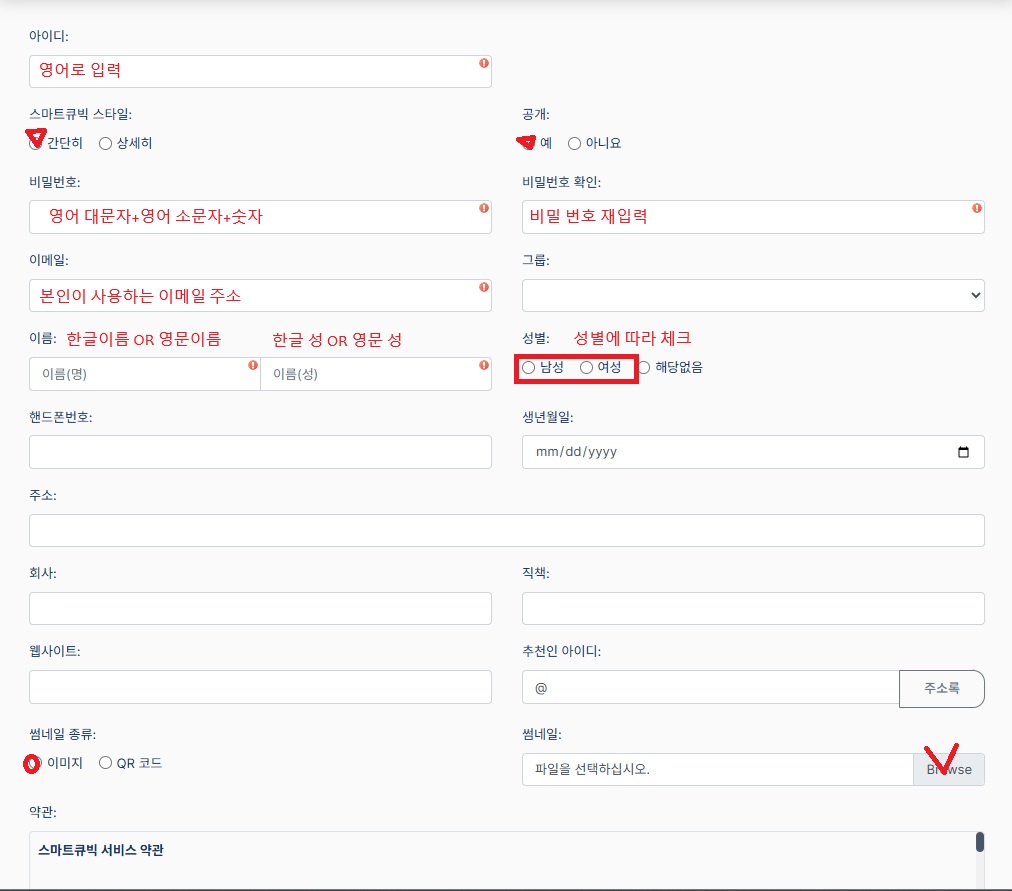
Registration: Proceed through the registration icon on the main screen. [00:15]

ID Setting: Mainly uses English characters, and the set ID becomes the personal website address in the form of allinKBR/userID. [01:20]

Public Setting: Determines whether outsiders can access your site depending on the 'Public' status. [01:51]

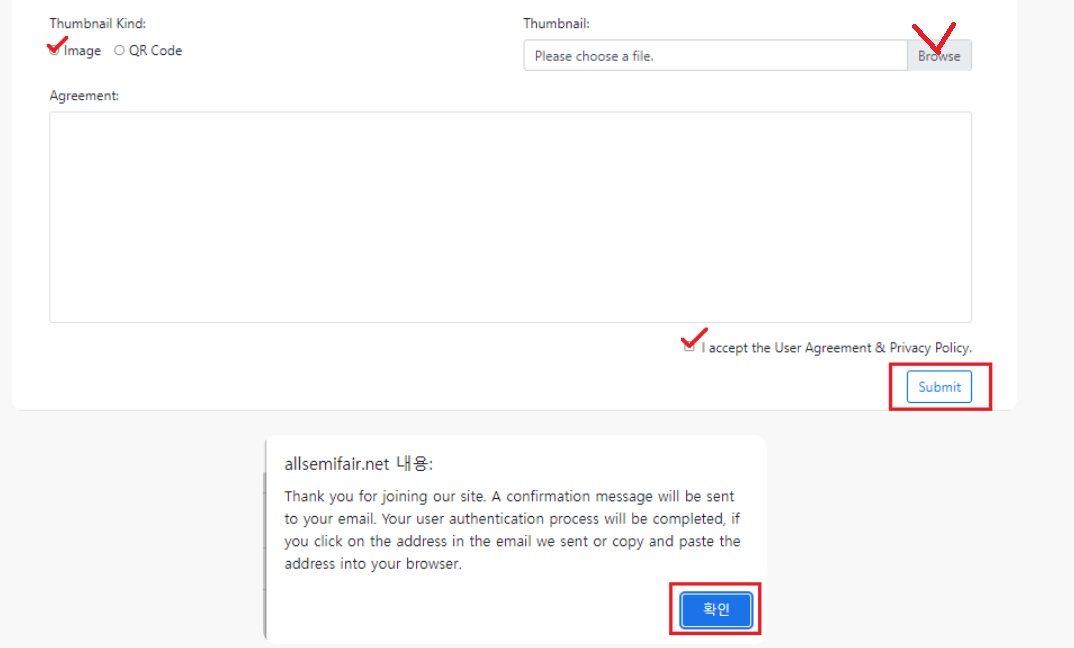
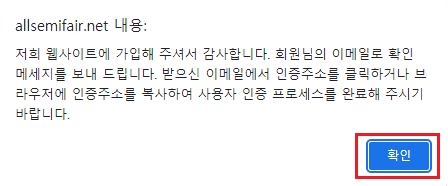
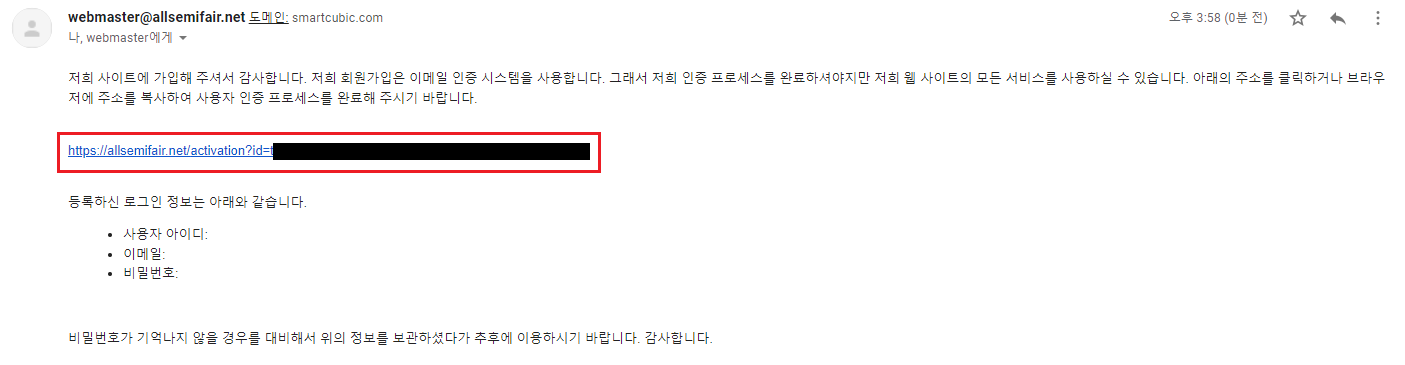
Email Verification: After registration, you must go through the verification process in the entered email to log in. [03:50]

Registration Registration Screen

1. Registration Screen

Registration Screen

2. Registration Completion

Registration Completion Email Verification

3. Click the Verification Link Sent to Email to Activate (Check Received or Spam Mailbox in Your Email)

2

Smart Cubic Creation Method

Smart Cubic is a core unit for creating and exchanging dynamic product catalogs, brochures, etc., like a homepage. [08:14]

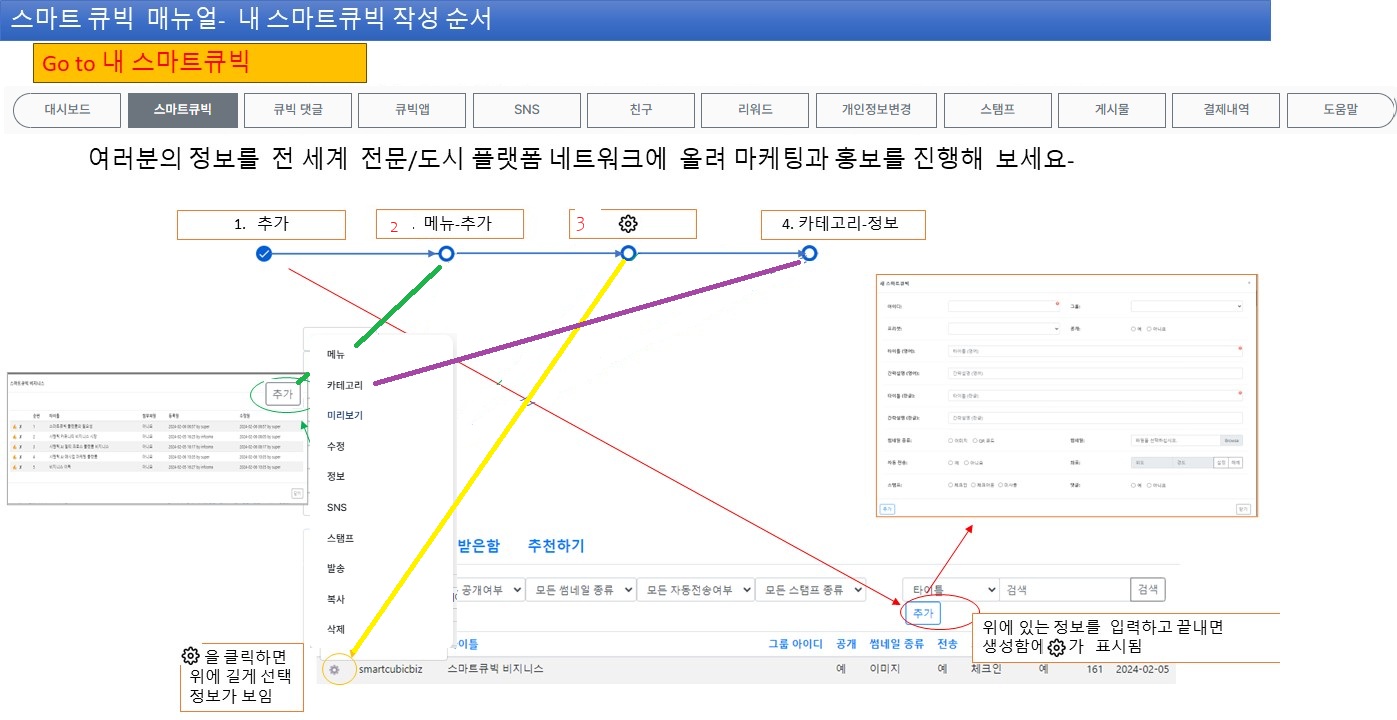
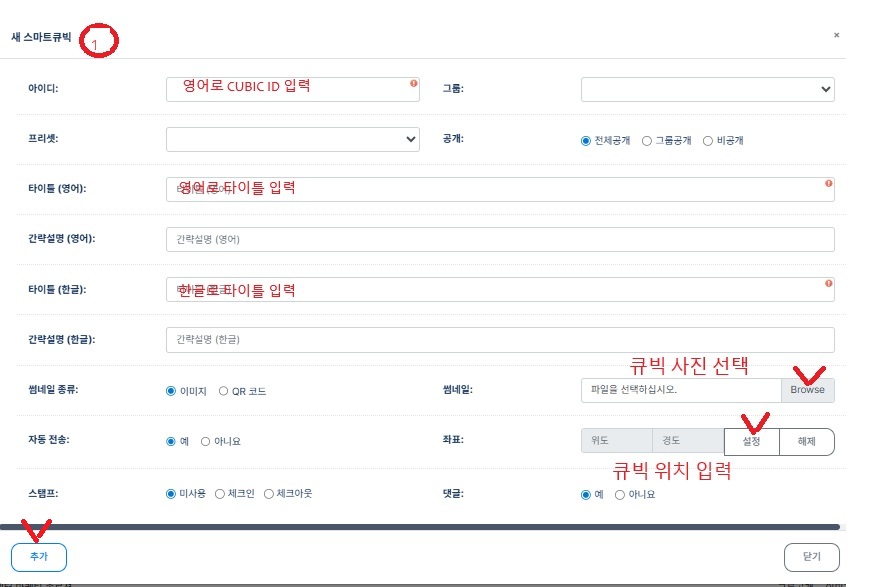
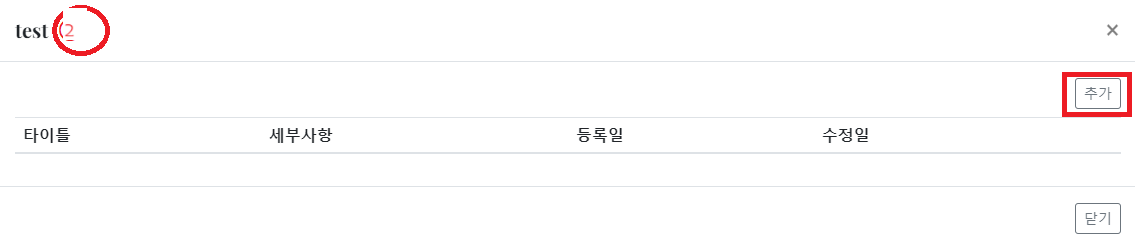
1. Add Cubic: Press the 'Add' menu to enter the Smart Cubic ID and information. [07:46]

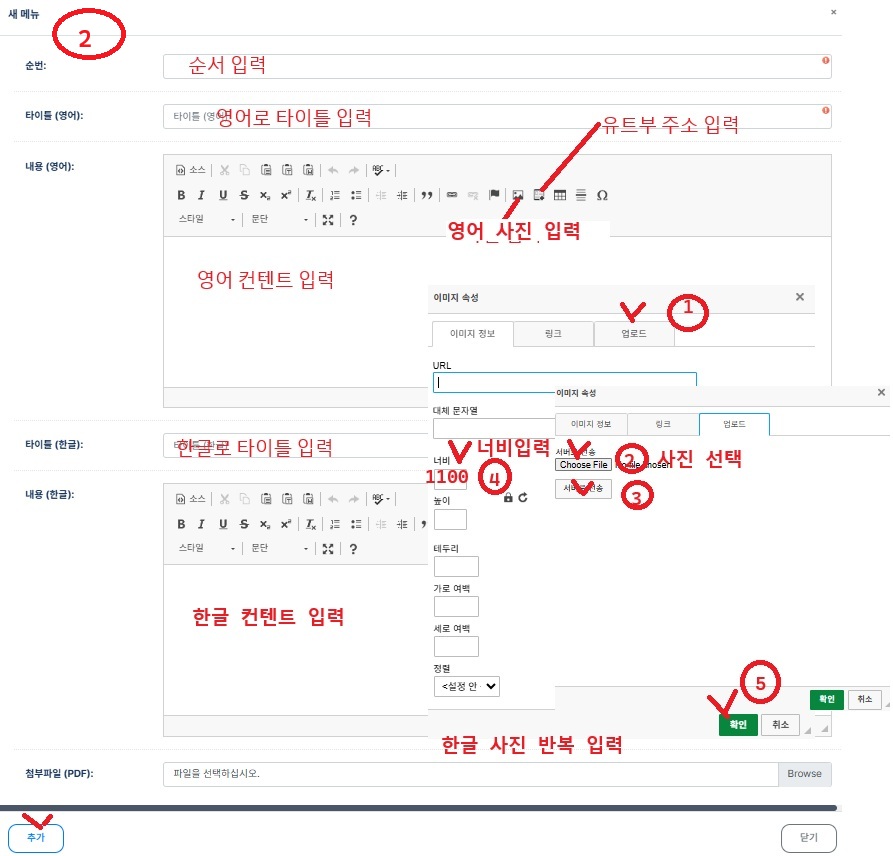
2. Content Composition (Images and Videos):

o Copy and paste the YouTube address to link the video. [14:31]

o Recommended width for image upload is 1100px or 1024px (mobile optimization). [15:57]

3. Multilingual Support: Korean and English information can be entered simultaneously, and it is automatically displayed according to the user's smartphone language setting. [16:47]

4. Adjust Display Order: Assign numbers to each content to determine the display order. The smaller the number (e.g., 1), the closer to the front of the webpage it is placed. [25:39]

Add SmartCubic

1. Add SmartCubic

Add Menu Menu Setting

2. Add Menu

Addition Completion Sharing
3

Advanced Functions and Utilization

Word Integration: Even vast documents of over 300 pages can be uploaded while maintaining the table of contents and hyperlinks created in Word, turning them into a 'digital book'. [30:57]

Automatic Transmission QR: When someone scans the QR, the corresponding information is immediately sent to that person's 'Received Box'. [10:48]

Stamp (Check-in) Function: Can be used as a marketing tool such as giving rewards for 10 visits to a store, and operates based on GPS (within 1km radius) to prevent fraud. [11:37], [41:29]

Category Integration: Registering your Cubic in a specific category (e.g., news, tech) automatically exposes it on related portal sites or search engines. [38:59]

4

Communication and Sending

Message Sending: Like email, enter the other party's ID to send Smart Cubic information. [44:05]

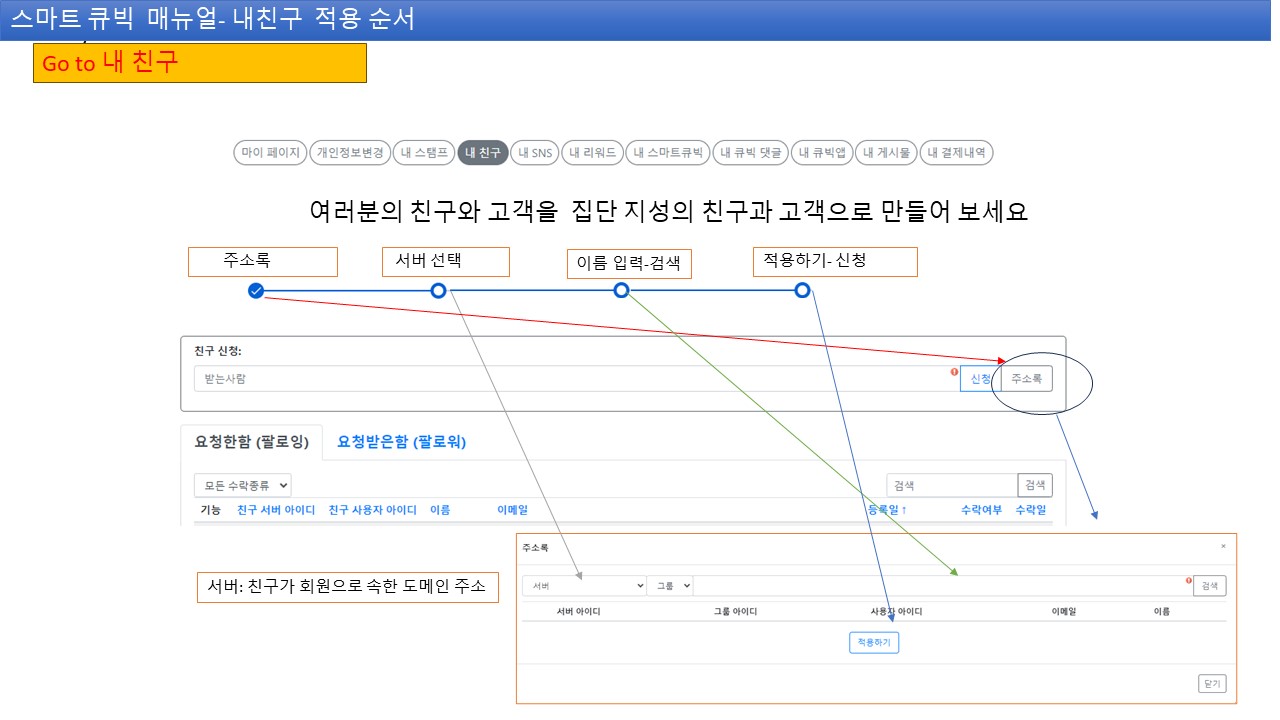
Address Book and Friends: Sort users who have become friends to manage marketing targets. [46:44]

SNS Connection: Add links to Instagram, Facebook, Twitter, etc., in icon form to link from the personal site. [43:20]

5

Reward System

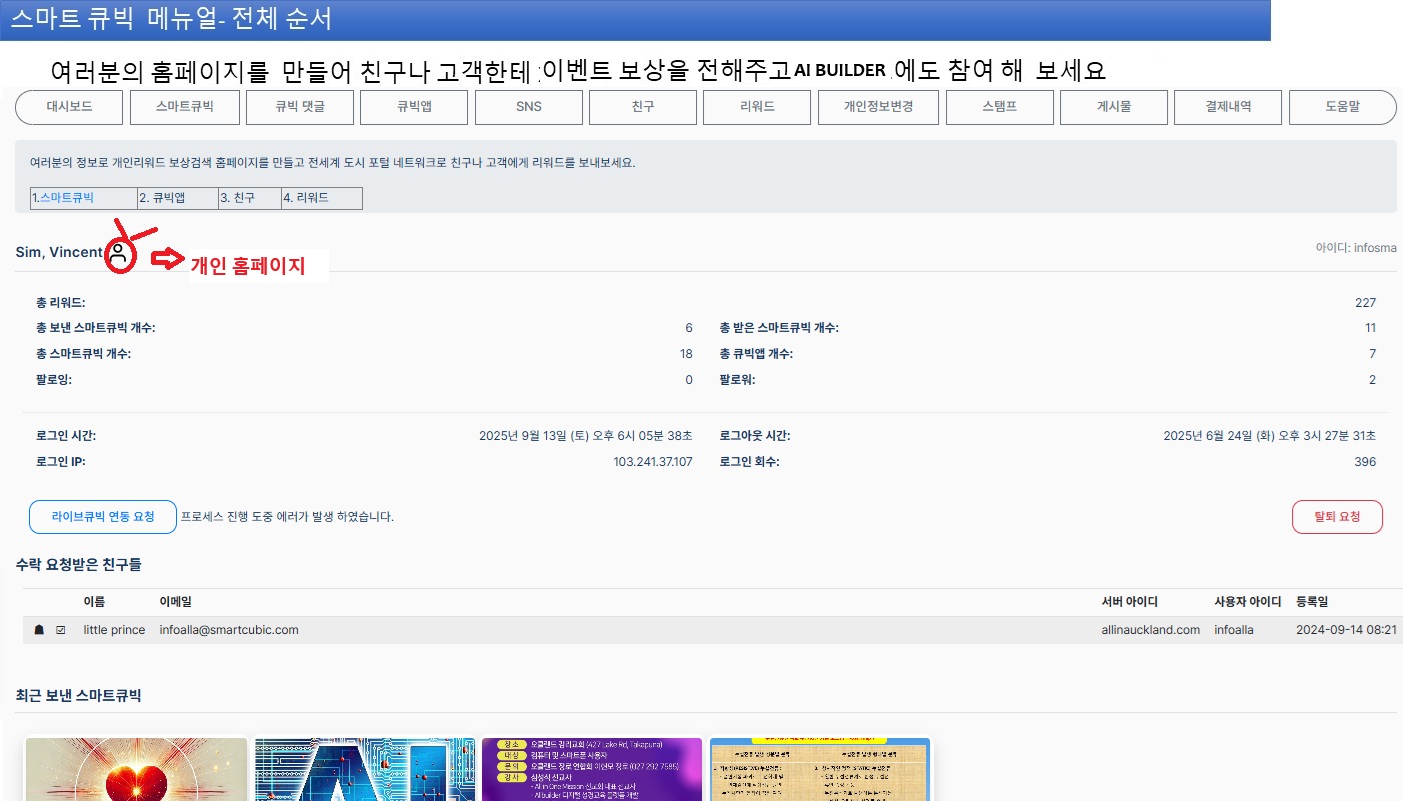
Activities such as registration, Smart Cubic creation, and following accumulate reward points. [06:29]

Usually, 10 points of reward are added each time a Smart Cubic is created. [18:16]

Benefits and Target Users

Key Benefits

Provides accurate and up-to-date information, personalized experiences, and easy creation/sharing functions. Excellent for business efficiency such as e-commerce/small business promotion, solving information overload and non-real-time issues of existing platforms.

Target Users

Individuals (small business owners, community members), companies (e-commerce operators, global businesses), institutions (churches/schools, local communities, ESG/agriculture-related organizations).

SmartCubic Usage Process

1

Registration and Initial Setup

Click the 'Registration' button in the upper right corner of the SmartCubic homepage. Enter essential information such as ID, password, email, name, phone number, then click the link sent to the email to activate the account. After activation, complete the account by entering a profile photo and additional information. You can strengthen security settings in this process.

Registration Registration Screen

1. Registration Screen

Registration Screen

2. Registration Completion

Registration Completion Email Verification

3. Click the Verification Link Sent to Email to Activate (Check Received or Spam Mailbox in Your Email)

2

Login and Dashboard Access

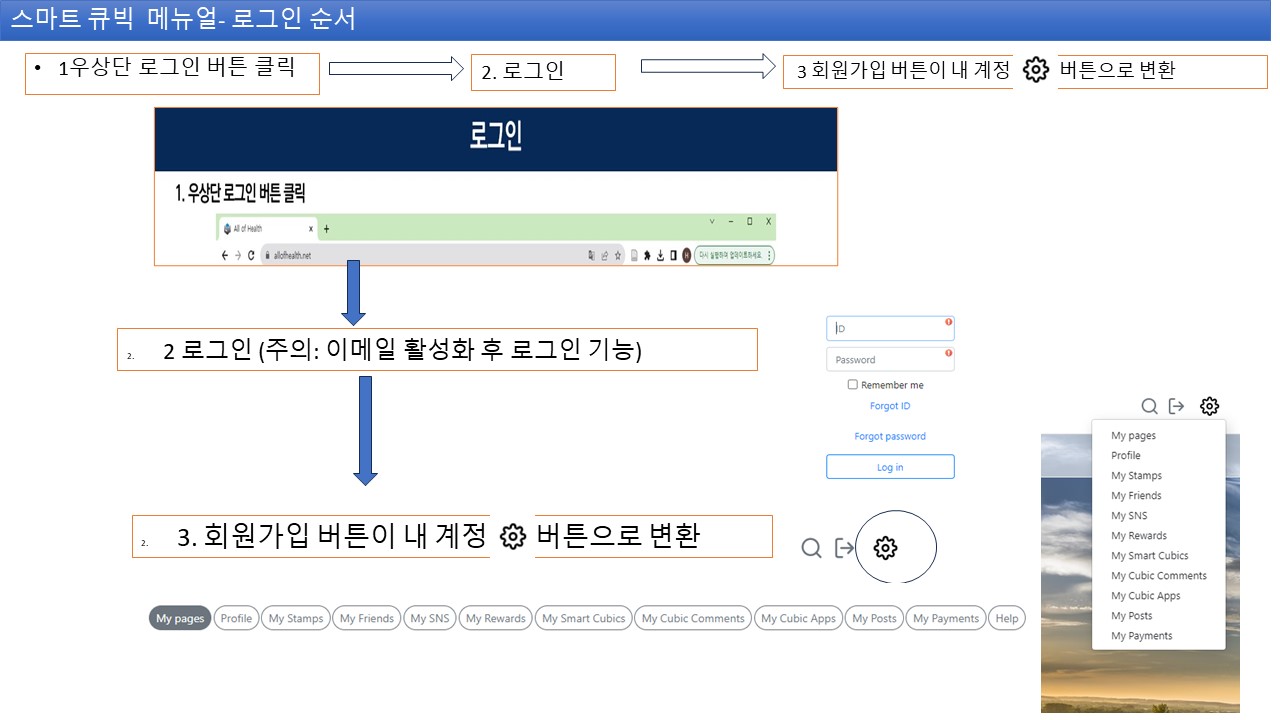
After email verification is complete, use the 'Login' button to log in. Upon login, the button changes to 'My Account', and clicking it moves to My Page. On My Page, adjust personal settings and customize notification preferences.

Login and Account Settings

After email verification, log in and set personal information and profile in the 'My Account' menu. If it didn't arrive in your email (check received or spam mailbox in your email). Strengthen security with 2FA settings.

Login Screen Personal Portal Creation
3

Personal Portal Page Creation

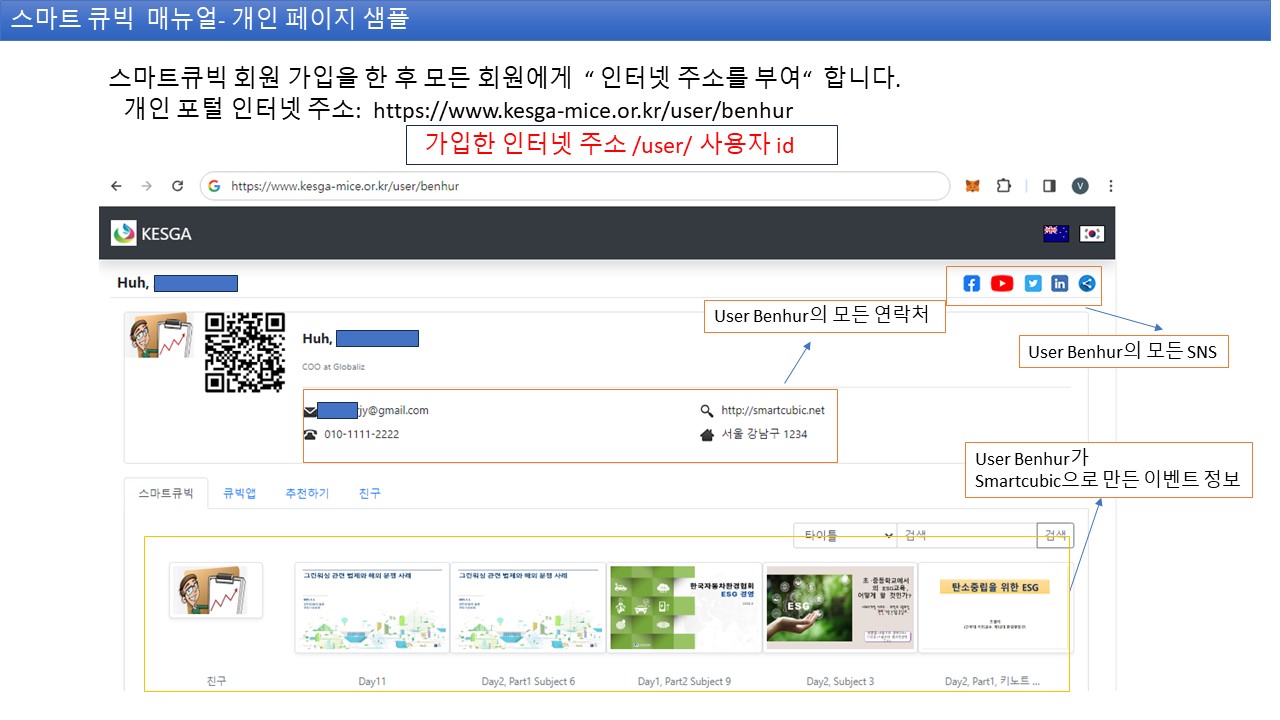
All members are assigned a unique internet address for creating their personal portal. Including self-introduction, business card, contact information, social media links, etc., it can be used as a tool to promote oneself to acquaintances. Choose a design template to create a unique page.

Portal Settings Portal Completion
4

SmartCubic Creation and Sharing

In 'My SmartCubic', set categories and keywords through 'Add' and then share QR and address.

Add SmartCubic

1. Add SmartCubic

Add Menu Menu Setting

2. Add Menu

Addition Completion Sharing
5

Group Page Operation

After collecting 30 personal pages, apply for group creation (region/club), start chat/events/permissions management.

Group Creation Group Settings Member Invitation Start Activity Operation Tools

Reward System

Activities such as registration, Smart Cubic creation, and following accumulate reward points. [06:29]

Usually, 10 points of reward are added each time a Smart Cubic is created. [18:16]

Expert Tips

SMARTCUBIC is not just a simple homepage creation tool, but a 'dynamic social network service' that updates and distributes information in real-time through **meaning-based IDs (ID)**. Even if an address is issued once, if the content is modified, the updated content is immediately reflected on the screens of tens of thousands of users who have shared it. [34:01]

YouTube Source Related Video: smartcubic education

Story SmartCubic Manual

**SmartCubic (SMARTCUBIC)** is not so much a collection of complex technologies, but an **'intelligent urban and business operating system (OS)'** that changes the way we live in the digital world. We explain it through everyday analogies so that ordinary people can intuitively understand.

1. Four Key Analogies Explaining SmartCubic

① CubicPass: "Global Common Digital Passport Without Need for Registration"

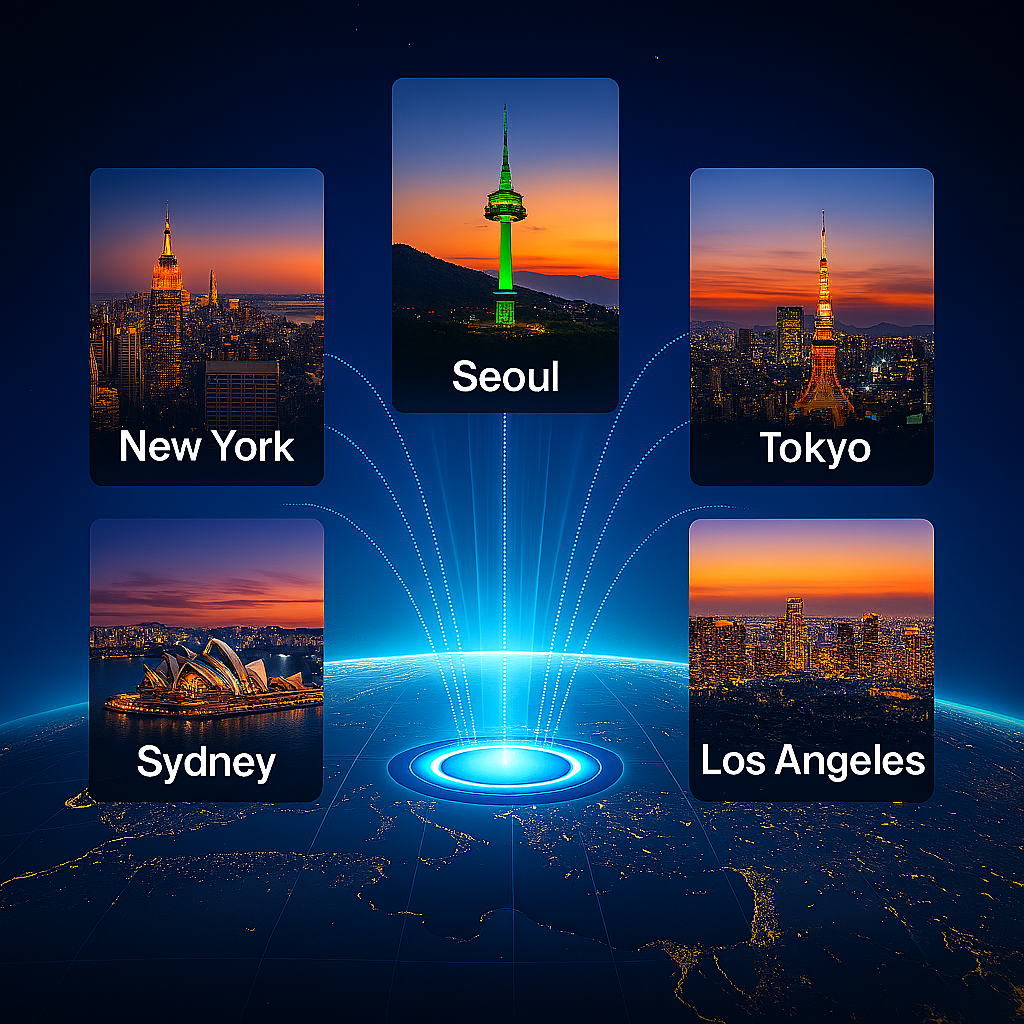
• Analogy: Just like passing through airports with one passport without filling out new forms each time when traveling abroad, CubicPass is the passport of the digital world. The ID and password received here connect to portals in 12 cities worldwide, such as LA, Sydney, New York, Tokyo, Seoul.

• Explanation: No need to enter name or phone number and register like existing services. Just scan the QR code at the store, and a secure ID called 'me' is immediately created, allowing enjoyment of all benefits without login.

② MetaCubic: "Not a Rented SNS, but a 'Digital Home' Registered in My Name"

• Analogy: If Facebook or Instagram is a 'temporary tent built on someone else's land (platform)', MetaCubic is **'a sturdy house built on my land in my name'**.

• Explanation: Data such as where I visited, what reviews I left, etc., is not owned by the platform but fully my asset accumulated in my portal (home). This information later serves as evidence for receiving benefits or proving trust.

③ Semantic AI: "Not a Search Engine That Finds Only Keywords, but a 'Secretary That Knows My Inner Thoughts'"

• Analogy: Not a machine that only finds book titles in a library, but like a professional librarian who understands "my usual favorite tastes and current situation" and selects books.

• Explanation: Not simply searching for "good restaurant", but AI connects **"a neighborhood restaurant that matches my health condition and recommended by a friend I trust"** based on the records in my MetaCubic. All information has a unique 'internet address (URI)', connecting accurately without fake information (AI hallucination).

④ RewardCubic: "The 'Our Neighborhood Golden Points' That Become Money the Moment You Participate"

• Analogy: Not just points given only when buying things, but a system where good behaviors like walking, recycling, using local stores immediately become currency.

• Explanation: If my activities help the local community, AI analyzes them and gives rewards. These rewards can be used like cash at local cafes or restaurants, acting as an engine that revitalizes the neighborhood economy on its own.

2. SmartCubic User Journey at a Glance (Easy-to-Understand Flow)

The process of people encountering SmartCubic is very simple:

1. Scan (Entry): Scan the QR code at the neighborhood cafe (no registration process).

2. Connection (Security): The CubicPass attached to my smartphone device securely authenticates me.

3. Record (Asset): The menu I ordered and the review I left are automatically saved in my MetaCubic portal.

4. Reward (Economy): Receive RewardCubic as compensation for regular activities, and get discounts on the next visit.

5. Expansion (Growth): My activity data is shared on **local portals (https://yangpyung.kr/ etc.)** to activate the entire commercial district.

3. Why SmartCubic? (Differences from Existing Platforms)

Category Existing Services (Portals, SNS) SmartCubic (SmartCubic)
Data Owner Platform Owned User Owned (Accumulated in My MetaCubic)
Search Method Keyword-Centric, Ad-Focused Semantic AI (Understanding Taste + Situation)
Reward System Purchase-Centric Participation/Good Behavior-Centric (Local Economy Circulation)
Personal Information Collected and Sold by Platform Protected by CubicPass, Controlled Only by User
Scalability Locked in One Platform Connected to Global City Portals

In summary: SmartCubic is a technology that creates a **"digital village where I become the owner of my data, share benefits with the neighborhood commercial district in a clean internet world without ad attacks, and grow"**.

① CubicPass: "Global Common Digital Passport Without Need for Registration"

Scanning the address with the QR photo above will display login information on the site below. The login site below appears, and enter the ID and password given at the counter there.

Additional Screenshots and Examples

QR Code Example Login Site Dashboard AllInAuckland Site Received Smart Cubic Reward System User Portal

Start Digital Innovation with SmartCubic Semantic Artificial Intelligence

The SmartCubic platform helps effectively manage, communicate, and grow information. It can be utilized in various industries and reflects the latest trends with continuous updates.

An innovative platform utilizing Semantic Web 3.0 technology to more effectively achieve vision and mission. Provides community support and professional consulting services.

Start Free Trial

YouTube Source Video

Copyright © 2025 SmartCubic All Rights Reserved.

SmartCubic User Manual

SmartCubic User Manual

Start Your SmartCubic Journey

Semantic Web 3.0 technology-based next-generation platform for information creation, sharing, and communication. This platform is designed to allow users to efficiently create and share information, integrating various digital tools to provide a modern communication environment. Innovate your business and personal activities with SmartCubic.

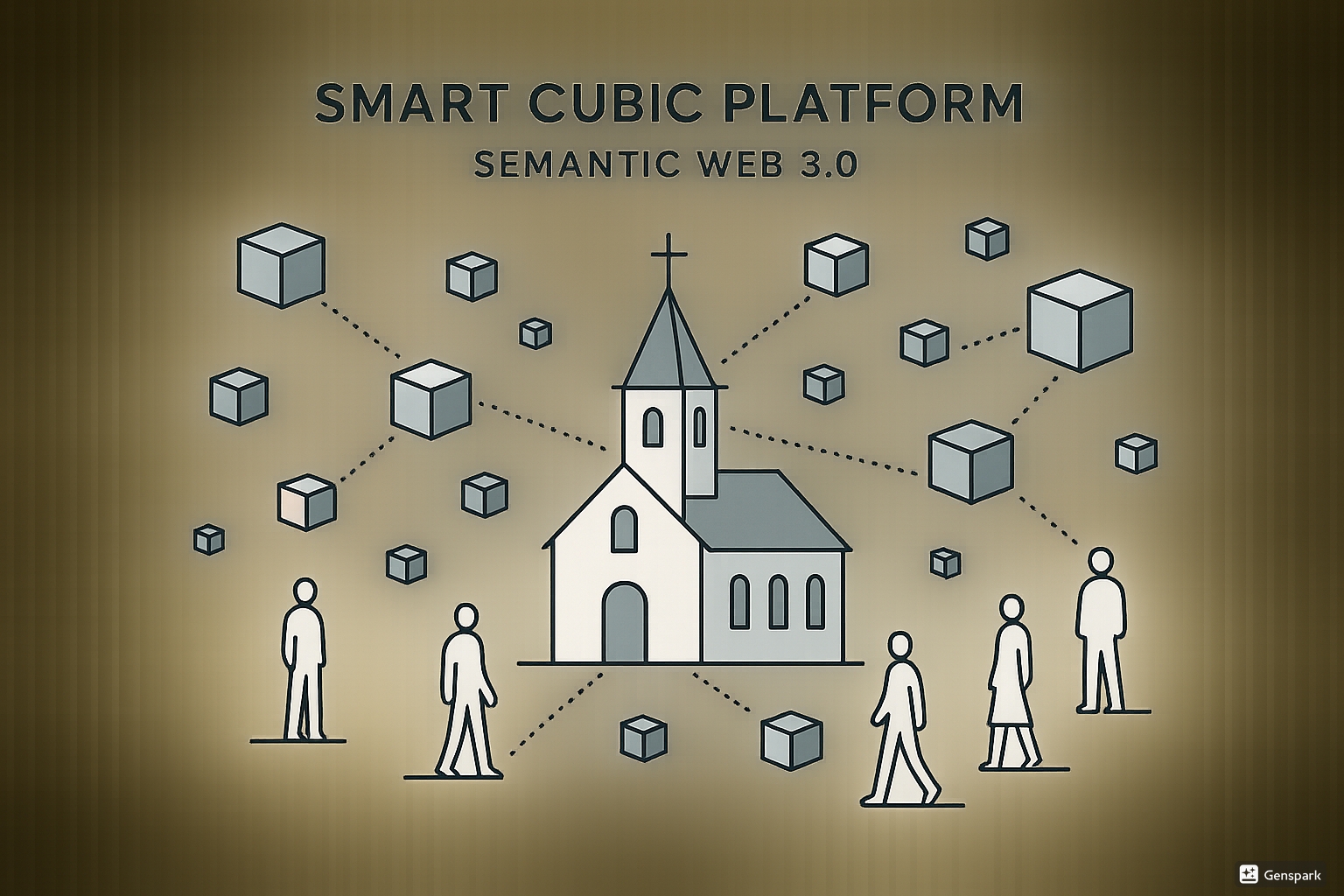
SmartCubic Platform Concept Diagram

What is the SmartCubic Platform?

Information Unit

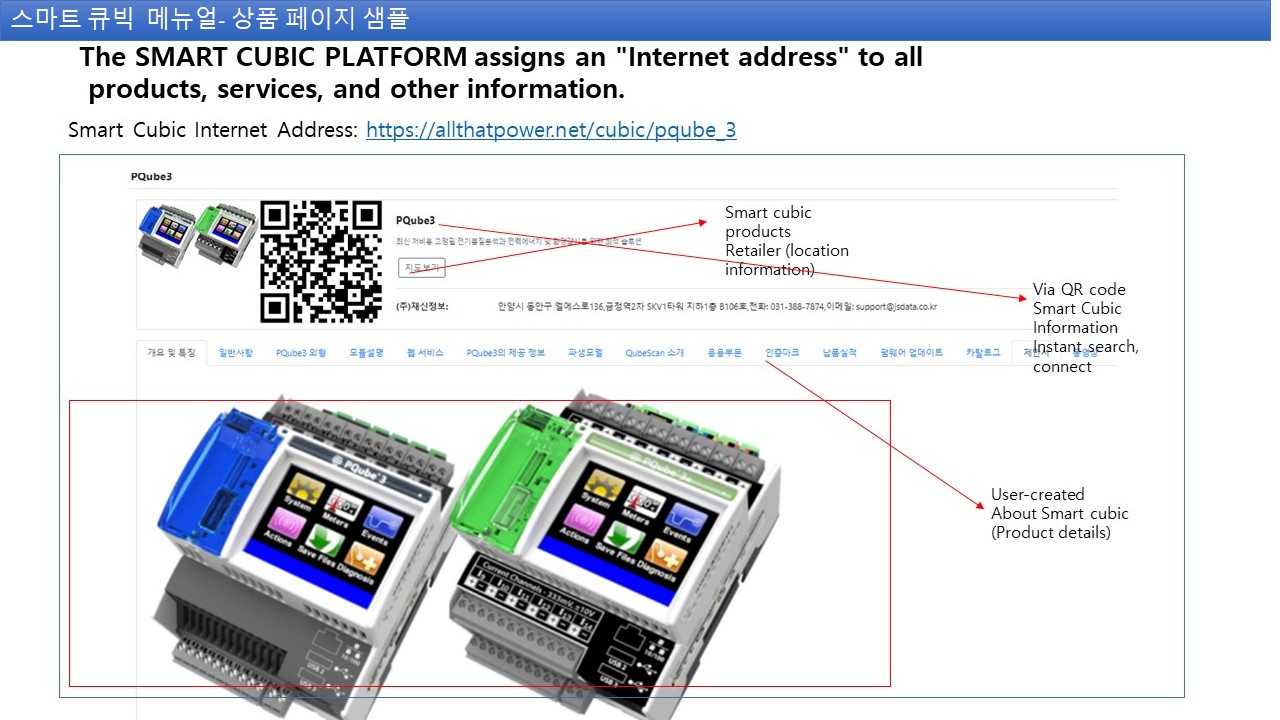
SmartCubic is a unit for creating and sharing digital information such as products, services, advertisements, and notices. All information is systematically managed. This unit is user-centered, simplifying the entire process from information creation to distribution. For example, entering product information automatically categorizes it, making searches easier.

Unique Internet Address

All created SmartCubics are assigned unique internet addresses for easy access and sharing. Through this address, information can be accessed anytime, anywhere, with enhanced security to ensure safe data sharing. Shared addresses are permanent and automatically updated when changes occur.

Information Dissemination and Marketing

Share SmartCubic addresses via social media like KakaoTalk to easily disseminate information without additional costs and maximize promotional effects. Built-in analytics tools allow real-time monitoring of sharing counts and views. Use this to provide optimized content to your target audience.

Semantic Search Innovation

Intuitive icon-based search, improved information accessibility within communities, and structured Semantic Web 3.0 foundation make information searching easier. An AI-based recommendation system is added to suggest relevant information based on user search patterns. This feature is particularly useful for efficiently exploring large amounts of data.

Main Functions and Features

Personal Homepage (Personal Portal)

  • All members are provided with unique internet addresses. This address is optimized for personal branding.
  • It can include all personal information such as self-introduction, business card, contact information, and social media links. Easily customize using templates.
  • Use it like a personal homepage to effectively promote professionalism. Emphasize your career with the portfolio addition feature.
  • Track who visited with visitor analytics tools.

SmartCubic (Information Unit)

  • It is a tool for promoting and marketing various digital information such as products, services, and advertisements on a global network. Easily insert videos and images with multimedia support.
  • All SmartCubics are automatically assigned unique internet addresses that can be shared on social media. Includes QR code generation feature.
  • Set various options such as public visibility and automatic transmission to freely control information dissemination methods. Automate scheduled distributions with timer settings.
  • Allow multiple users to collaboratively edit Cubic with collaboration features.

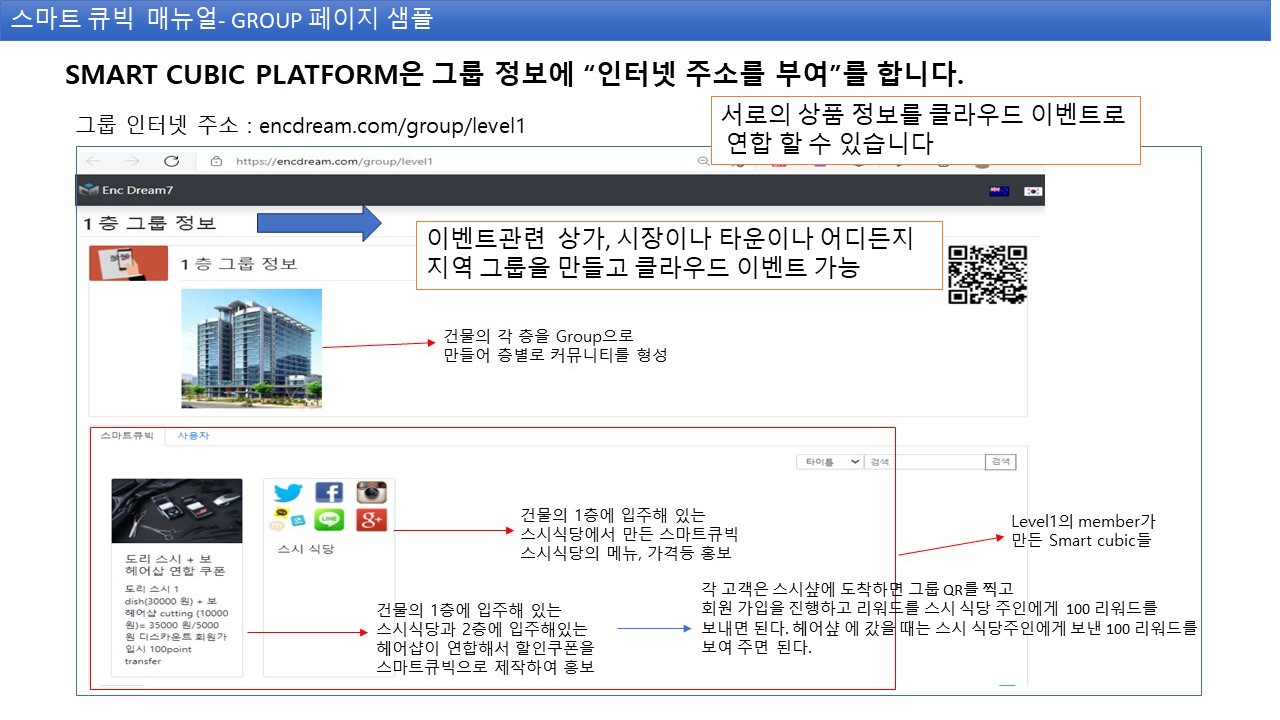
Group Page

  • Create regional communities, clubs, and shopping mall groups. Enable real-time communication with in-group chat features.
  • Create groups for specific shopping districts, markets, villages, and host regional cloud events. Simplify participant registration with event management tools.
  • Create floor-specific communities for building residents. Immediately deliver important notices with notification systems.
  • Clearly distinguish roles between administrators and members with permission settings.

Cubic App (My Cubic App)

  • It is a multi-design mobile hybrid app accessible in various environments. Compatible with both iOS and Android.
  • Supports multilingual (Korean/English), QR code integration, and social media connections. Additional language support is planned.
  • Can be linked with blogs/cafes, digital memberships, event platforms, and metaverses. Easily integrate with external services via API.
  • Offline mode support allows some functions to be used without internet.

Friends and Reward Management

  • It serves as a social network that turns friends and customers into "collective intelligence friends." Strengthen networking.
  • Use the 'Friend Request' function in the 'My Friends' menu to form new relationships. Recommend users with similar interests through profile matching.
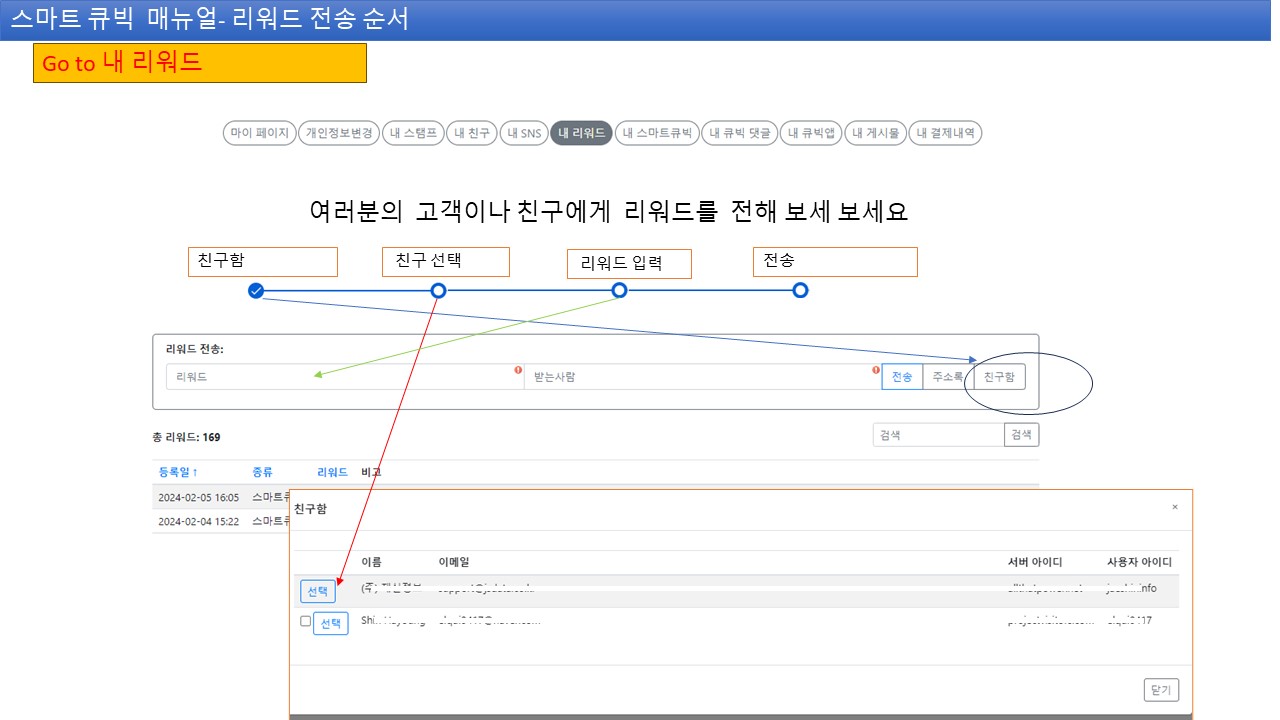
  • Send rewards to friends in the 'My Rewards' menu. Encourage activities with a point system.
  • Check reward history and create customized campaigns.

SmartCubic Utilization

Efficient Information Delivery

Deliver information quickly and accurately through cost-effective promotional channels. Maintain the latest information with real-time update features. Measure and optimize delivery effects with analytics tools.

Community Activation

Strengthen communication among members and encourage participation to create a more active community. Easily collect opinions with forums and voting features. Increase participation rates with event notifications.

Improved Information Accessibility

Anyone can easily access necessary information with intuitive icon-based search. Prioritize frequently used information with customized dashboards. Comply with accessibility guidelines so all users can use it conveniently.

Support for Various Environments

Smooth access is possible in various digital environments, including mobile and web. Data synchronization between devices is automatic with cross-platform support. Ensure safe use through security protocols.

Administrative Efficiency

Digitalize notices, schedules, and document management to greatly improve administrative efficiency. Reduce repetitive tasks with automated workflows. Track change history with document version management.

Expanded Mobile Accessibility

Maximize accessibility through QR code scanning and mobile app integration, and enable mass message transmission via social media and email. Receive important updates immediately with push notifications. Provide region-specific content with location-based services.

SmartCubic Usage Process

1

Registration and Initial Setup

Click the 'Register' button in the upper right corner of the SmartCubic homepage. Enter required information such as ID, password, email, name, phone number, then click the link sent to your email to activate your account. After activation, enter your profile photo and additional information to complete your account. You can strengthen security settings during this process.

2

Login and My Page Access

After email verification is complete, use the 'Login' button to log in. Upon login, the button changes to 'My Account', and clicking it takes you to My Page. Adjust personal settings and customize notification preferences on My Page.

3

Personal Portal Page Creation

All members are assigned a unique internet address to create a personal portal. Include self-introduction, business card, contact information, social media links, etc., to use as a tool for promoting yourself to acquaintances. Select design templates to create a unique page.

4

SmartCubic Creation and Sharing

Click the 'Add' button in the 'My SmartCubic' menu to create a new SmartCubic. Set menu, category information, keywords, then share the unique internet address on social media to maximize promotional effects. Use the preview function to check before sharing.

5

Group Page Establishment and Operation

Create regional groups and host cloud events. Designate each floor of a building as a group to form communities among residents. Maintain stable operations with group rule settings and moderation tools.

Introduction Process

1

Registration and Initial Setup

Click the 'Register' button in the upper right corner of the platform → Enter required information such as name, email, password → Click the email verification link to activate the account. Check the spam folder. After activation, learn the platform through tutorials.

Registration Screen

1. Registration Screen

Registration Screen
2

Login and Account Settings

After email verification, log in and set personal information and profile in the 'My Account' menu. If not received in your email (check the inbox or spam folder of your email). Strengthen security with 2FA settings.

2. Registration Complete

Registration Complete Email Verification

3. Click the Verification Link Sent to Email to Activate (Check the Inbox or Spam Folder of Your Email)

3

Personal Portal Page Creation

In the 'My Account' menu, create a personal homepage and enter necessary information (introduction, contact, SNS links, photos, etc.). Add widgets to enrich the page.

Login Screen Login Screen
4

SmartCubic Creation and Sharing

In the 'My SmartCubic' menu, create necessary information (notices, events, materials, etc.), set categories, and share via SNS or QR code. Increase searchability with tag systems.

2. Add Menu


Addition Complete


1. Add SmartCubic

Menu Addition
5

Group Page Establishment and Operation

Create group pages for intra-company small groups, departments, ministry teams, etc., and invite members to start activities. Use in-group file sharing and calendar functions.

Group Creation Group Settings Member Invitation Start Activities Operation Tools

Start Digital Innovation with SmartCubic

The SmartCubic platform helps effectively manage, communicate, and grow information. It can be utilized in various industries and reflects the latest trends with continuous updates.

An innovative platform utilizing Semantic Web 3.0 technology to achieve visions and missions more effectively. Provides community support and professional consulting services.

Start Free Trial
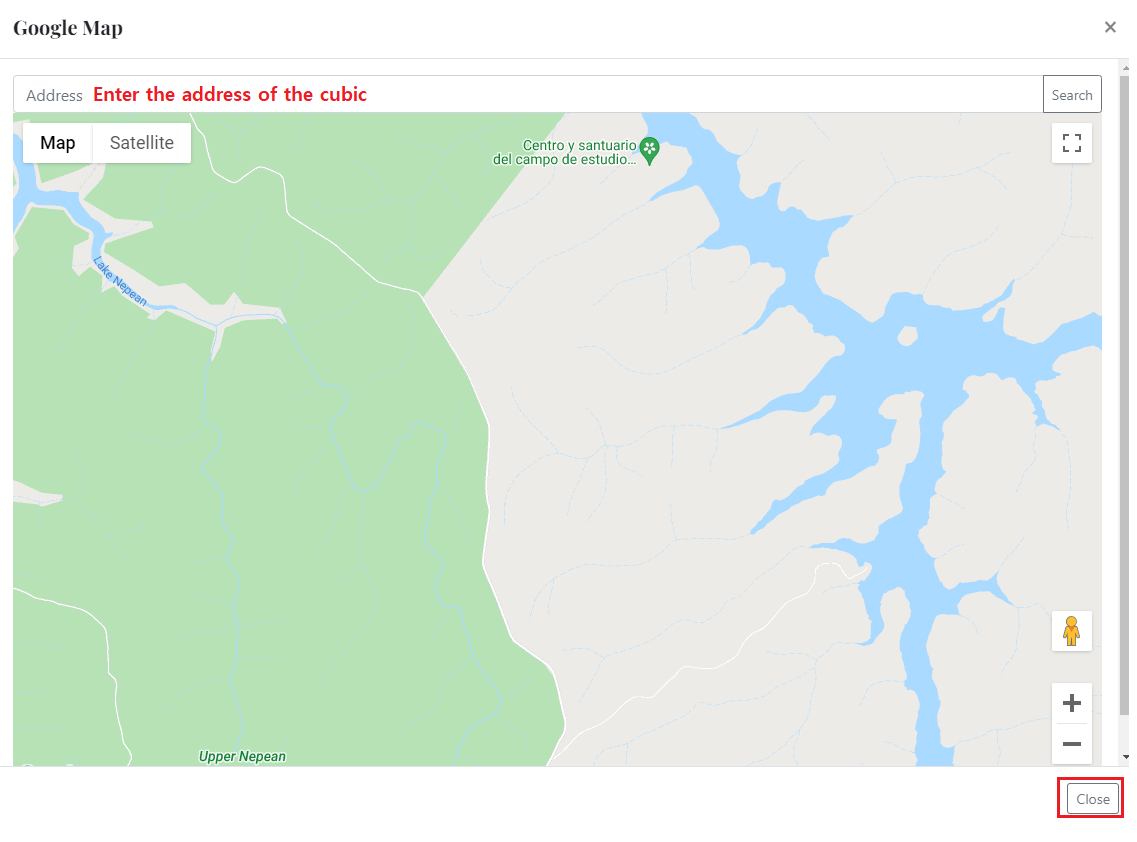
Google Map
© Yangpyung ^